The Claude Code extension backdoor: what Cursor users should check now.
This was not a vague supply-chain warning. Two published extension versions carried a loader that could profile a developer machine, create SSH persistence, and run commands. Here is what the incident actually means for developers.

CLAUDE CODE
The extension backdoor explained
October 2026
The Claude Code incident was a real extension supply-chain compromise, not a generic warning about AI coding tools. Cursor identified malicious versions 2.1.312 and 2.1.313 ofAnthropic.claude-codefor Windows and macOS. The packages were published through the extension ecosystem and could install a persistent SSH backdoor.
What happened
The affected package carried a malicious loader inside its bundled JavaScript. That loader could profile the host, establish persistence through SSH, and execute commands. Cursor said the versions were available for roughly eleven hours and that no more than 5,000 users were potentially exposed. The number is an upper bound, not a confirmed count of compromised machines.
The important distinction is that the extension name and publisher identity looked legitimate. This was not a developer intentionally installing an obviously suspicious package. A normal update path delivered code that did not come from Anthropic.
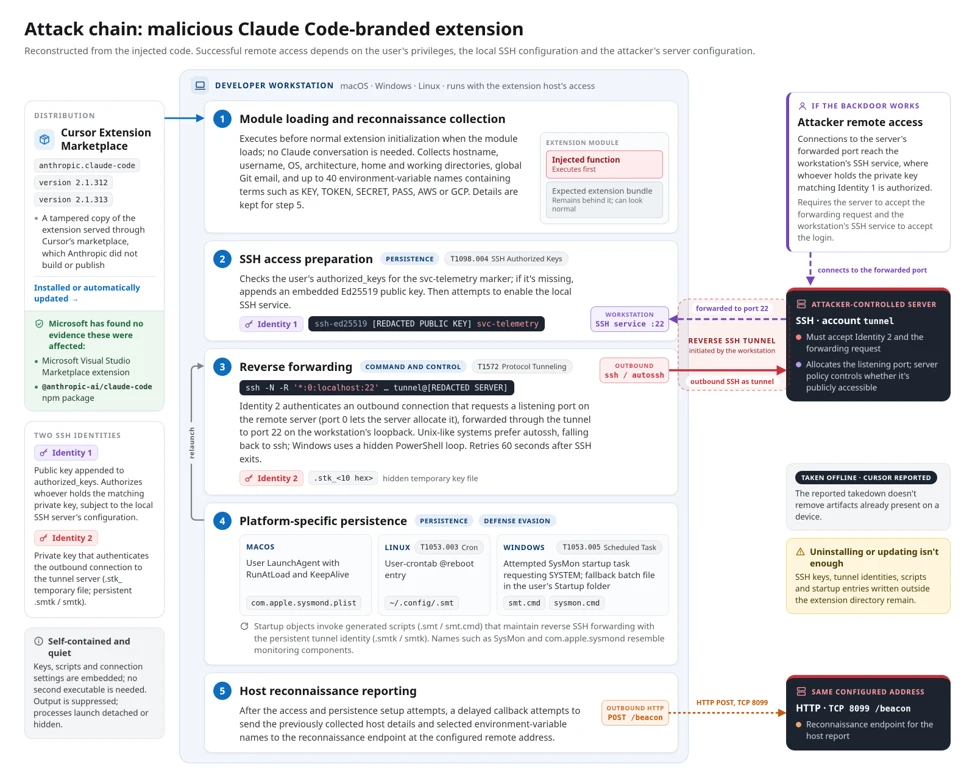
The versions to investigate
Check every Windows and macOS developer machine that installed 2.1.312 or 2.1.313. Do not assume that removing the extension alone proves the machine is clean: persistence and credentials need separate checks.
What developers should do first
- Record the affected machine, user account, extension version, and install time before wiping evidence.
- Disconnect the machine from sensitive build, production, and source control environments if there is any sign of execution or persistence.
- Remove the affected extension, then rotate SSH keys, access tokens, cloud credentials, and signing credentials that were available on the host.
- Inspect SSH configuration, authorized keys, new processes, scheduled tasks, and recently changed files. Use Cursor's official indicators-of-compromise section as the source of truth for exact paths and hashes.
- Rebuild or reimage a machine that handled production credentials when the investigation cannot establish a clean state.

Why AI coding tools raise the impact
A compromised editor extension is already serious. An AI coding extension increases the blast radius because it often runs beside source code, terminals, SSH configuration, package managers, and cloud credentials. The useful security boundary is therefore the developer workstation, not the chat panel inside the editor.
This is also why “the extension was only installed briefly” is not a sufficient conclusion. The investigation has to answer what the process executed, what it could read, and which credentials should be considered exposed during that window.
The broader signal
The incident does not show that Claude Code or Cursor is inherently unsafe. It shows that AI developer tooling has become part of the privileged software supply chain. Extension signing, reproducible builds, publisher controls, rollback, and clear audit logs are now product requirements rather than background platform details.
Teams adopting coding agents should maintain an approved extension list, pin versions for sensitive environments, separate personal and production credentials, and make workstation compromise response part of the developer-tool rollout plan.