REA turns reverse engineering into an evidence workflow for AI agents.
REA does not resurrect a product’s original source code. It gives coding agents a disciplined way to inspect software, follow one behavior at a time, and test a focused reconstruction against the evidence.

REA
Reverse engineering, with evidence
October 2026
REA is having a moment because it makes a difficult practice feel more conversational. But its useful idea is not that an AI agent can “read any app.” It is that a coding agent can work through the same evidence trail an experienced reverse engineer would use, without losing the question it is trying to answer.
What REA actually is
REA, short for Reverse Engineer Anything, is an open-source CLI and MCP server. It connects coding agents such as Claude Code, Codex, and Cursor to analysis tools for native binaries, JavaScript and Electron apps, .NET assemblies, Android packages, websites, and saved traffic.
The agent remains the interface you talk to. REA is the instrument panel behind it: it can ask a disassembler for a function, follow cross-references, inspect static code, and return the material needed to support or challenge an explanation. That is very different from asking a model to guess how a product might work from its UI.
GitHub: github.com/morluto/reaThe boundary worth keeping
REA does not recover a vendor's original source code, and a plausible decompilation is not a license to ship a clone. It helps investigate observed behavior. Authorization, license terms, local law, and the target's protections still define what work is appropriate.
The workflow: one behavior, then evidence
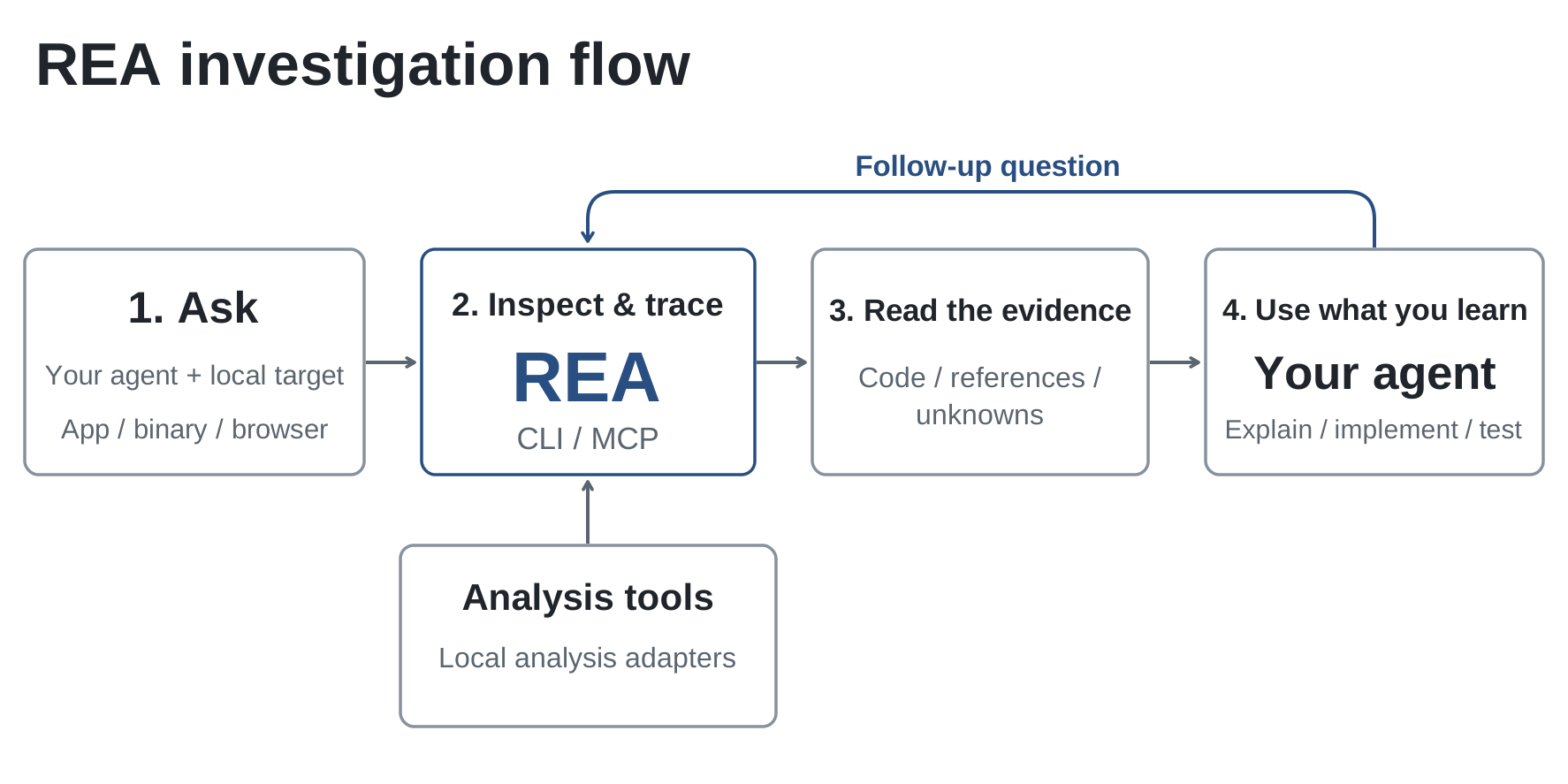
REA's own model is a closed loop: your agent asks about a local target; REA inspects and traces it through local analysis adapters; REA returns code, references, and explicit unknowns; then the agent uses that evidence to explain, implement, test, or ask the next question. The best investigations keep that loop anchored to one behavior. “Where does this Export button send its data?” gives the agent an entry point, a path to trace, and a result that can be checked.
- 1Name a behavior and the artifact you are allowed to analyze.
- 2Find an entry point: a UI handler, string, endpoint, error, or exported function.
- 3Trace calls, references, constants, and data transformations around that point.
- 4Write down the hypothesis with the code locations that support it.
- 5Build a small, independent check that could prove the hypothesis wrong.
Pick the analysis lane before opening a tool
REA is a routing layer, not one universal analyser. The target tells you what evidence can exist and which engine should be in the loop. Start with the lightest path that can answer the question; installing a native decompiler for a local JavaScript package only adds time and noise.
JavaScript / Electron
Trace handlers, preload bridges, IPC routes, bundled modules, and file or network boundaries. Static inspection can often answer the first question.
Web behavior
Connect an explicitly configured browser debugging session, then distinguish loaded code and observed requests from assumptions about the backend.
Android / .NET
Use the appropriate package or assembly analysis path, then follow callers and data transformations rather than treating a decompiled method as the whole story.
Native binaries
Bring Ghidra, Hopper, or IDA where authorized. Work from strings, exports, call sites, data references, and controlled inputs toward a bounded behavior.
What a useful evidence package contains
Treat the agent's response as a research note, not a verdict. A useful handoff lets another engineer reproduce the path without trusting the model's wording. In practice, that means preserving the target version and hash, the question, the exact tool or engine used, the relevant function or file locations, a concise hypothesis, and the smallest test that exercised it.
This changes review quality immediately. “The app uses this formula” is weak. “These call sites and constants lead to this formula in version X; these boundary inputs produced these outputs” is a claim someone can audit. If a step only comes from inference, label it as inference.
Why the verification step matters
REA's own introductory example follows an Electron app's export button through renderer code, a preload bridge, IPC, and the main process. It then tests the CSV formatter with commas and quotation marks. That last check is the important part: static evidence can show the intended path, but a focused test establishes whether the recovered rule behaves as claimed.
This is also how to work around an agent's most familiar failure mode. A fluent explanation is not evidence. Ask it to separate observed code from assumptions, cite functions or files, and state exactly what it ran. When the evidence is thin, the report should be thin too.
Static analysis is a starting point, not execution proof
Decompiled or bundled code reveals structure, but it may not reveal runtime configuration, feature flags, server-side decisions, permissions, timing, or an external dependency that changes the final behavior. A browser request can show what the client sent; it cannot establish the service logic behind the request. The same caution applies to a native branch that is present but never reached for the tested input.
Use a controlled test only where you have authorization and can keep the target isolated. The goal is to validate a behavioral claim, not to probe production systems. Preserve negative results too: knowing which hypothesis failed prevents the next investigation from circling back to the same plausible-sounding mistake.
Three mistakes that make the output less trustworthy
- Starting with a whole product instead of one named behavior. Scope drifts before the evidence gets useful.
- Letting the agent rewrite its own hypothesis after every tool call. Keep an explicit claim and record what changed it.
- Mistaking configuration success for analysis success. An MCP registration or a healthy CLI only proves the plumbing; a scoped tool result and a repeatable check prove the workflow.
Where it is genuinely useful
The strongest use cases are not “copy a product.” They are compatibility, migration, security research, incident response, file-format understanding, and recovering behavior from software you own or are authorized to assess. A team can also use the method to compare releases, locate a regression, or capture the contract an internal legacy tool still enforces.
A more useful way to think about the trend
REA does not replace reverse engineering expertise. It changes the interface to that expertise. The opportunity is faster navigation from a question to supporting artifacts; the responsibility is to keep the investigation scoped, legal, and reproducible. Teams that preserve those constraints get something more durable than a one-off answer: a testable account of how a specific behavior works.